Recently, GUI YACC debugging has become more popular than any time before. Although GUI application can provide user-friendly interface, it is very slow mainly due to the fact that it has to deal with graphics library overhead which is usually much less efficient than the YACC code itself. A stand alone, portable and efficient YACC debugger is becoming much more important for programmers who are using parsing and lexing tools to build theirs own compilers and searching for quick implementation. Under this circumstance, ABRAXAS SOFTWARE provides you a powerful YACC interactive debugger called PCYDB.
PCYDB is a command-line and GUI based YACC debugger tool, which uses most advanced lexing and parsing techniques available, bringing everything inside parsing execution to your fingertips. It allows you to stop parsing execution at any point, examine and change grammar file, and “single step” through the parsing execution. When execution is paused, the internal data of the parser can be displayed and examined to pinpoint problems. PCYDB provides several important functionalitites, which you can benefit from when building your own parser. These functions are listed as following:
• See the Parse Tree
• See the Parsing Stack
• See Conflict Parse Trees
• See Grammar Rule Matches
• See Regular Expression Matches
• See the Flow of your Input Data
• See Various Tables
Detailed descriptions of these functionalities will be presented in their respective chapters.
LR parsing is currently most popular parsing technique. This parsing method is called bottom-up because it tries to construct a parse tree for an input string beginning at the leaves (the bottom) and working up towards the root (the top). It scans the input from left-to-right and constructs a rightmost derivation in reverse. There are several reasons why this technique is quite popular.
• For any programming language that can be defined using a context-free grammar, LR parsers can be generated to parse the source code written in that language.
• The LR parsing technique is more general than any of the other common shift-reduce techniques. Although it is more general, the degree of efficiency can be as good as other methods if implemented correctly.
• When scanning through the input from left to right, LR parser can detect errors as soon as possible.
However, implementing a LR parser in an efficient way is not an easy task. Fortunately, ABRAXAS Software provides PCYACC - a LR parser generator to help you avoid doing too much work to implement a LR parser by hand for a typical programming-language grammar. PCYACC is used to generate deterministic bottom-up parsers. The generated parser starts with the input word of the program source code, which is internally recognized as a token and attempts to match a syntax structure for a string of tokens. If a string of tokens matches a rule specified in the context-free grammar, a production is found by the parser. When a right production side is found, reduction to the nonterminal of the left side takes place. The parser then alternates between reading the next input symbol and executing as many reductions as necessary. The number of necessary reductions is determined by whatever the initial reduction result is and the fixed-length section of the remaining input. The bottom-up parser finishes its job by reading all its inputs and reducing it to the start symbol specified by the context-free grammar.
The syntax analysis parsers are based on the theory of automata and formal languages. The important theorem that lays down the foundation of the syntax parsing concerns the relationship between a syntax free grammar and a pushdown automata:
(1) for every context-free grammar a pushdown automaton can be constructed which accepts the language defined by the grammar.
(2) the language accepted by a pushdown automaton is context free, and therefore has a context-free grammar (which is even effectively constructible).
Because a pushdown automata can be constructed for any language that can be defined by the context free grammar, almost all the computer programming languages are defined using the context free grammar. A LR parser is a realization of the pushdown automata that accepts the context free grammar specification of a language.
An LR parser consists of a parsing table and a driver routine. The parsing table is generated from the context-free grammar of a language by a parser generator. The driver routine makes sure the execution of the parser follows the specification of the parsing table. The driver routine is the same for all LR parsers; only the parsing table changes from one parser to another. The driver routine is also usually copied to the parser code by a parser generator. The parsing table is the key component of a LR parser because it determines the characteristics of the parser. Figure 2-1 shows the generation of parsing table and the parser’s functionality.
 PCYACC

 Grammar Parsing Table
Parser Generator
(a) Parsing table generation.

 Driver Parsing

 Input Output
 Routine Table
(b) Parser Functionality.
Figure 2-1. Parsing Table and Parser Functionality
Abraxas’s PCYACC is responsible for generating a LALR (Look Ahead LR) parser. It generates the parsing tables from an input grammar description file. The LALR parser thus generated is fairly powerful and can be implemented efficiently.
Figure 2-2 shows the internal operation of an LR parser. The parser includes an input, a stack, a driver routine and a parsing table. A parsing table consists of two parts, action and goto. The input is actually a token.
 t1 ••• ti ••• tn $ Input


 sm Driver Parsing

 Xm Routine Table
Stack sm-1
Xm-1
•••
s0
Figure 2-2. Diagram of LR bottom-up parser
The token is passed to the parser by a lexer. Every time the parser needs a token, the parser calls the lexer. The lexer reads the input source code and translates them into tokens. For simplicity, in Figure 2-2, the input is shown as an integer array, which represents every token of the input stream with the input order preserved. The functionality of the lexer is conveniently omitted. The driver routine reads the input tokens from left to right from this input one at a time. The driver routine populates the stack in the form of s0X1s1X2s2…Xmsm, where sm is on the top of the stack. Xi represents a grammar symbol and si is a state symbol. The information held in the stack below the state symbol is summarized by the state symbol. The state symbol on the top of the stack along with the current input symbol (token) determines the index into the parsing table and the corresponding shift-reduce parsing decision. The grammar symbols are not absolutely necessary to be put onto the stack in actual implementations. It is included here to help describe the operation of an LR parser.
There are two parts contained in a parsing table, ACTION functions and GOTO functions. The driver routine determines the current state on top of the stack sm based on the information saved on the stack below. It also reads in the current input token ti. The driver routine then calls the function ACTION[sm, ti], to determine the parsing action table entry for state sm and input token ti. The parsing table entry determined by ACTION[sm, ti] can have one of four values:
· shift s
· reduce 
· accept
· error
The GOTO function determines the next state to goto based on current state on the top of the stack and the current input symbol. It is essentially the transition table of a deterministic finite automaton whose input symbols are the terminals and nonterminals of the grammar.
A configuration of an LR parser consists of the stack contents followed by the unexpanded token stream as shown below:
( s0 X1 s1 X2 s2 • • • Xm sm, ti ti+1 • • • tn $)
The parser decides on its next action to take by examining the current state sm on top of the stack and reading in the next token from the input. The parsing table entry ACTION[sm, ti] points to four types of actions that the parser will take. They are described as follows,
· If ACTION[sm, ti] = shift s, the parser takes a shift action, the configuration after executing a shift is
( s0 X1 s1 X2 s2 • • • Xm sm ti s, ..ti+1 • • • tn $)
Here s = GOTO[sm, ti] is the next state, which is also determined by the current state sm and current input token ti. Thus the current input token and the next state is shifted onto the stack. Notice that ti+1 now becomes the new current input token.
· If ACTION[sm, ti] = reduce the grammar description of the form, a reduce action is executed by the parser, after which the configuration becomes,
( s0 X1 s1 X2 s2 • • • Xm-r sm-r A s, ti ti+1 • • • tn $)
where s = GOTO[sm-r, A] is a state determined from sm-r state and left hand side of a production A. Here r is the length of  , the number of terminals and non-terminals on right side of the production. The parser pops r state symbols and r grammar symbols off the stack, leaving state sm-r at the top of the stack. Then the parser pushes the left-hand side of the production A onto the stack. Finally, the next state s, which is determined by the entry for GOTO[sm-r, A], is pushed onto the stack. During the parser’s reduce action, no change is made to the current input tokens. If the sequence of the grammar symbols popped off the stack is reconstructed in sequence, it looks like,
Xm-r+1 ••• Xm,
it should always match the right hand of the reduction production .
· If ACTION[sm, ti] = accept, then all the parsing is completed, all the grammar rules have been reduced to the start symbol.
· If ACTION[sm, ti] = error, the parser detected errors in the input token string, an error handling routine is called to display messages and recover from the error.
The algorithm that the LR parser uses for its operation is very simple. It starts with a designated initial state s0 and an initial configuration of
(s0, t1 t2 • • • tn $)
where t1 t2 ••• tn is the token string to be parsed. The parser determines its next action to execute based on the current state and current input token. This process iterates until it reaches an accept action or an unrecoverable action. Almost all parses behave the same way, the difference exists only in the parsing table where the next state or next action is specified.
To illustrate the operation of an LR parser, we will use a very simple example. The simple grammar we will use in this example is:
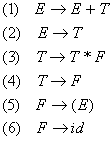
Assume we have a parser generator like PCYACC which generates both the driver routine and parsing table for us already. The parsing table specifying the action and goto functions of an LR parser is shown in Figure 2-3.
State | Action | Goto |
| id | + | * | ( | ) | $ | E | T | F |
0 | s5 | | | s4 | | | 1 | 2 | 3 |
1 | | s6 | | | | acc | | | |
2 | | r2 | s7 | | r2 | r2 | | | |
3 | | r4 | r4 | | r4 | r4 | | | |
4 | s5 | | s4 | | | | 8 | 2 | 3 |
5 | | r6 | r6 | | r6 | r6 | | | |
6 | s5 | | | s4 | | | | 9 | 3 |
7 | s5 | | | s4 | | | | | 10 |
8 | | s6 | | | s11 | | | | |
9 | | r1 | s7 | | r1 | r1 | | | |
10 | | r3 | r3 | | r3 | r3 | | | |
11 | | r5 | r5 | | r5 | r5 | | | |
Figure 2-3. Parsing table for LR Bottom-up Parser.
The meanings of the actions are:
· si shift and stack state i,
· rj means reduce by production numbered j,
· acc means accept,
· blank means error.
The next state to go to that is specified by the value of GOTO[s, t] for terminal token t is found in the action field connected with the shift action on input t for state s. The goto field gives GOTO[s, T] for nonterminal T. However, how the entries are selected is solely determined by the parser generator when it is generating the parsing tables for an LR parser. And this is also where the difference between LR parsers comes from.
Now, assume an input token stream id * ( id + id ) will be parsed. The sequence of actions taken by the parser and the state of stack and input token stream is shown as following in Figure 2-4.
| Stack | Input | Action |
(1) | 0 | id * ( id + id )$ | shift |
(2) | 0 id 5 | * ( id + id )$ | reduced by r6 |
(3) | 0 F 3 | * ( id + id )$ | reduced by r4 |
(4) | 0 T 2 | * ( id + id )$ | shift |
(5) | 0 T 2 *7 | ( id + id )$ | shift |
(6) | 0 T 2 *7 ( 4 | id + id )$ | shift |
(7) | 0 T 2 *7 ( 4 id 5 | + id )$ | reduced by r6 |
(8) | 0 T 2*7 ( 4 F 3 | + id )$ | reduced by r4 |
(9) | 0 T 2*7 ( 4 T 2 | + id )$ | reduced by r2 |
(10) | 0 T 2*7 ( 4 E 8 | + id )$ | shift |
(11) | 0 T 2*7 ( 4 E 8 + 6 | id )$ | shift |
(12) | 0 T 2*7 ( 4 E 8 + 6 id 5 | )$ | reduced by r6 |
(13) | 0 T 2*7 ( 4 E 8 + 6 F 3 | )$ | reduced by r4 |
(14) | 0 T 2*7 ( 4 E 8 + 6 T 9 | )$ | reduced by r1 |
(15) | 0 T 2*7 ( 4 E 8 | )$ | shift |
(16) | 0 T 2*7 ( 4 E 8 ) 11 | $ | reduced by r5 |
(17) | 0 T 2*7 F 10 | $ | reduced by r3 |
(18) | 0 T 2 | $ | reduced by r2 |
(19) | 0 E 1 | $ | Accept |
Figure 2-4. Actions of LR parser on id * ( id + id )
The LR parser starts with an initial state of 0 (line (1)). The current input token is id, the action to take is found in the parsing table based on the state number and input token symbol. The action in row 0 and column id of the action field of Figure 2-3 is s5, meaning shift (putting one input token onto stack from input stream) and fill the stack with state 5 on the top. After execution of the action, the first token id and the state symbol 5 have both been pushed onto the stack, and id has been removed from the input token stream with the remaining input stream as “* ( id + id )”. This is illustrated in line (2).
Now, * becomes the current input token, and looking at the action of state 5 on input token * is to reduce by r6. Since r6 is referenced to F®id, so two symbols (one state symbol and one grammar symbol) are popped from stack and only state 0 remains on the top of the stack. According to parsing table, the destination state of goto function on state 0 for F nonterminal is state 3, so nonterminal F and state 3 have been pushed onto stack. Similarly, the remaining moves on input id * ( id + id ) can be deducted according to previous description. The operation of the parser completes by reaching an accept action or stopped by encountering an error action.
III. How PCYDB Works
PCYDB is a YACC debugger designed for the purpose of debugging parsers generated by Abraxas PCYACC. It allows user to follow the entire parsing procedure, examine almost real-time changes in stack, parse tree and input token stream. It also allows user to compare the internal operation of the parser and how grammar rules are matched.
The LR parser theory that Abraxas PCYACC based on has been covered in the previous chapter. The following chapters focus on describing PCYDB internal functionalities, debugger commands and examples illustrating the usage of PCYDB.
To use PCYDB effectively, it is helpful to understand some of the internal working of the LR parser generated by PCYACC tool.
The internal state of a parser is a point where the parser is reading input from the token stream and ready to handle one of them. The driver routine inside the parser consults the parsing table to switch between states and take appropriate actions.
The parser generated by YACC uses the internal states to subdivide the parsing process into simpler processes. For each step, the parser reads its input token stream and based on current state and current input token to determine the action to take the picks the next state by checking the lookahead token (next token in the input stream).
Each state is assigned a number. The initial state is usually numbered as state 0 to distinguish it as the parser’s initial condition before any token is read from the input stream. Others states are numbered when YACC generates the parser and is dependent on the implementation of YACC.
For each internal state of a parser, there are several actions that can be taken. The possible actions are:
· Shift to a new state
· Reduce one or more input tokens to a single nonterminal symbol, according to a grammar rule
· Go to a new state
· Accept the input
· Find an error
The actual action taken by the parser is determined by the current state the parser is in and the current input token. Most of the time several choice of actions exist at each state, special states also exist that the parser can only have one action no matter what the input lookahead token is.
The following is a description for each of the possible actions that the parser can take. Understanding these actions will be a great help for comprehend the inner workings of PCYACC parser.
The shift action is taken by the parser when the parser is in the middle of validating a grammar. The lookahead token is read in and several possible states can be selected by the parser as the next state. The choice is made based on the lookahead token and current state. After entering the new state, the parser can shift to another state based on the next lookahead token read from the input stream.
Internal to the parser, there is a state stack to keep track of the state transitions that the parser is experiencing. The stack records the history of the states that the parser has been in. When the parser shifts to a new state, the previous state is pushed onto the state stack.
In addition to the state stack, there is a value stack, which records the values of tokens and nonterminal symbols during the source code parsing process. The token value is returned by the lexer “yylex” called by the parser. It is usually implemented as a global “yyval”. A nonterminal symbol value appears in the grammar description file as $$. Its value is set by the recognition action associated with the symbol’s definition. If the symbol’s definition did not have an associated recognition action, the value of this symbol is the value of the first item in the symbol’s definition.
The Shift action simultaneously pushes the current state onto the state stack and the global “yyval” (the lookahead token) onto the value stack.
When the parser recognizes all the items that make up a non-terminal symbol, the parser will take the Reduce action irrespective of what the lookahead token will be. A Reduce action is the result of parser recognizing the nonterminal symbol in a grammar rule.
The Reduce operation first pops several states off the state stack. If the recognized nonterminal symbol had N components, the Reduce operation pops N-1 states off the state stack. The parser actually goes back to the state it was once in when it first began to gather the recognized constructs.
The value stack is modified next. If the grammar rule definition being processed has N components, then a total of N values will be popped off the value stack by the Reduce action. The symbols $N, $N-1, ..., all the way down to $1 that usually show up in the grammar rule definition are assigned theses values popped off the stack sequentially.
After assigning all the $N, $N-1, ..., $1 values, the Reduce action invokes the recognition action associated with the grammar rule being processed. The nonterminal symbol value represented by $$ is determined by the values of $N-$1 and the grammar rule itself. The $$ value is then pushed onto the stack as a replacement of the N values that were previously popped off the value stack.
If there is no recognition action associated with the nonterminal, or if the associated recognition action does not set the value $$, then the Reduce action simply puts back the value $1 back on to the value stack. (Pactically, $1 is simply not popped off the value stack in the first place)
The last clean up action performed by the Reduce action is to setup the lookahead symbol such that it seems to be the nonterminal symbol that was just recognized.
The Goto action is a continuation of the Reduce process. Goto action is almost identical to the Shift action; the only difference is that the Goto action takes place when the lookahead symbol is a nonterminal symbol while a Shift takes place when the Lookahead symbol is a token.
While the Shift action pushes the current state onto the state stack, the Goto action does not have to do this: The current state was on the state stack already. Shift action also pushes a value onto the value stack, but Goto action does not. This is because the Goto action happens after the Reduce action and the value corresponding to the nonterminal symbol was already put onto the value stack by the Reduce action. The destination state was determined by the parsing table based on the current state and the nonterminal symbol, and Goto action replaces the top of the state stack with the destination state.
After the parser transitioned to the destination state, the current Lookahead symbol is restored to whatever the current input token it was at the time of the Reduce action.
Thus the essential difference between a Goto action and a Shift action is that Goto action takes place when the parser goes back to a state after the completion of the Reduction action while Shift action is based on the current parser state. Also, a Shift action is based on the value of a single current input token, whereas a Goto action is based on a nonterminal symbol prepared by the Reduce action.
The Accept action is the successful end point of the parsing process. It happens when the parser has processed all the input tokens correctly and the parser has reduced all the grammar rules to the start symbol. When the conditions for Accept action is true, the yyparse() function returns a zero to the calling function indicating a successful parsing of the input token stream according to the grammar rule descriptions.
The Error action is taken when the parser encounters encounters any input token that cannot legally appear in a particular input location. The parser usually canno do much to handle an input error except in extreme cases. However, it is highly undesirable to stop processing of the input token stream whenever an error is found. The more desirable behavior is for the parser to skip over the incorrect input and resume parsing as soon as possible. This is a much more efficient way of doing the parsing because the parser can identify most syntax errors during just a single pass through the input.
Most parser generators therefore tries to generate a parser that can restart as soon as possible after an error condition occurs. YACC does this by letting the user specify the points at which the parser should pick up after errors. User can also specify the actions to takke whene an error is found at those points.
The Error action has the following steps:
· See if the current state has a Shift action associated with the error symbol. If it does, shift on this action.
· If there is no Shift action associated with the current state, then pop the current state off the state stack and start checking the next state. To sync the state stack and the value stack, the value at the top of the value stack is also popped off.
· The previous step is repeated until the parser finds a state that has an associated Shift action to shift on the error symbol.
· Once this state is found, the Shift action associated with the error symbol taken. This pushes the current state on the stack - that is, the state that can handle errors. No new value is pushed onto the value stack; the parser keeps whatever value was already associated with the state that can handle errors, which is already on the values stack.
After the parser shifts out of the state that can handle errors, the lookahead token is whatever token caused the error condition in the first place. The parser then tries to proceed with normal processing.
2. PCYDB Working Process
PCYDB accepts four different combinations of input files:
· Grammar Description Files (GDF) plus input source code, lexers are hand written in the grammar description file (the lexer name has to be yylex())
· GDF and SDF (Scan Description File) plus the input source code, lexers are automatically generated by PCLEX
· Extended Grammar File (GDF and SDF combined in a single file) plus the input source code
· GDF plus an file specifying an array of integers representing the input token stream
PCYDB initializes internal parameters when invoked. Either specified on the command line when invoking PCYDB or by issuing genstate at the command prompt after invoking PCYDB, the grammar file is turned into the parser code needed. Along with the parser generation, necessary lexer code is also generated for obtaining tokens from input source code. This is unnecessary if a binary token input stream is directly specified.
Once the user entered the commands to set the break points, ..., etc, these break points are recorded internally in the PCYDB. When the user then entered any command to start executing the parser, the actual parser code is executed. Each time the parser completes one round of processing the input token, it checks against certain internal records to find out if there is any condition needs attention, e.g., breakpoints. If there is a break point, the execution is temporarily halted awaiting the user’s command to continue. When the execution is halted, internal states of the parser can be examined. This includes the parsing tables, state stack, value stack and token streams.
If the grammar description file has been changed during the PCYDB session, a genstate command can be used to regenerate the parsing tables and the parser. The new parser can also be reloaded into PCYDB without having to exit PCYDB. Debugging can now start from the beginning again on the modified grammar file. This makes it much easier to debug the YACC program.
PCYDB is different from the convention language debuggers that uses the operating system debugging services by setting hardware breakpoints and involving interrupt and exception handling routines. Instead PCYDB uses the internal state of the parser program itself to set the break points, etc. No interrupt and exception handing overhead is involved. Due to the efficiency of the implemented LR parser, using the internal state of the parser make PCYDB much faster than the conventional debuggers. It also offers operating system independence which is a very desirable feature.
 PCYDB
PCYDB
 LR Parser Token Stream
 Lexer
Lexer
 Grammar Description File Scan Description File
(GDF) (SDF)
Figure 3-1. PCYDB Interactions
Figure 3-1 shows the interaction between PCYDB and the LR parser and various other components.
IV. Using Text Version PCYDB
In this chapter, we will discuss how to start PCYDB, and how to get out of it. The essentials are:
· type “pcydb” to start PCYACC debugger.
· type “quit” to exit from PCYACC debugger.
You can invoke PCYACC debugger by running the program pcydb. Once started, PCYACC debugger reads in commands from the terminal until you tell it to exit.
You can also run pcydb with a variety of arguments and options, to specify more of your debugging environment. There are several ways to define your PCYACC debugging environment with a variety of command line options. The command-line options are described following.
The most usual way to invoke PCYACC debugger is to just type “pcydb” without any options following:
pcydb
If command line options are specified, the format of it should be:
pcydb [-g <GDF filename with hand-written lexer>] [-i <Input Source Code>]
pcydb [-g <GDF filename>] [-s <SDF filename>] [-i <Input Source Code>]
pcydb [-e <Extended GDF filename>] [-i <Input Source Code>]
pcydb [-g <GDF filename>] [-t <Token Input Stream File>]
These four formats correspond to the four possible input file combinations accepted by PCYDB. Not all the files need to be specified all on the command line. Some or all of the options can be set after invoking PCYDB by issuing various PCYDB commands.
Before start execution of the parser in the debug mode, however, a check is made on the availability of the grammar description file, the scanner description file plus the input source code or a token input stream file. If any one of them is missing, the LR parser execution cannot be started correctly and the debug process will not be successful. In this case, an error message will be displayed asking user to input more information by issuing related PCYDB commands before continuing.
To exit PCYDB after completing a debug session, type:
quit or q
command (abbreviated q). PCYDB will clean up all temporary files, and terminate normally, displaying the terminal command prompt to the user again.
A PCYDB command is a single line of input. There is no limit on how long it can be. It starts with a command name, which is followed by arguments whose meaning depends on the command name. For example, the command breaktoken accepts one argument which is a token number, as in “breaktoken 258”. However, some commands do not allow any argument like step, which simply executes one step of the parsing process starting from the current execution point.
Each PCYDB command has a corresponding abbreviation. All the possible command abbreviations are listed below for each individual command. A blank line as input to PCYDB does not mean to repeat the previous command like other traditional debugger, since unintentional repetition for some commands might cause trouble in the debugging session.
Set breakpoint to a specified state number. Since the parser uses the driver routine to consult the parsing table to switch between various states during the process of getting a token from input stream, setting a breakpoint at a particular state makes it possible to follow the execution of the parser and check the internal variables maintained by the parser. This command has one required argument statenumber. If this argument is missing, PCYDB will display a warning to the user to indicate missing argument and no action is taken by PCYDB.
Syntax format:
breakstate statenumber
Abbreviation:
bs statenumber
Set breakpoint at next specified token. PCYDB takes token integer array as its input, and switches state according to the input token and current state of the parser. By allowing a breakpoint when the parser sees a particular token, user can again check the internal variables and states of the parser to understand its operation. This command has one required argument tokennumber. If this argument is missing, PCYDB will display a warning to the user to indicate missing argument and no action action is taken by PCYDB.
Syntax format:
breaktoken tokennumber
Abbreviation:
bt tokennumber
This command clears all the break point set using the previous two commands. It requires no argument. Error message will be displayed if any additional argument is specified.
Syntax format:
clearbreak
Abbreviation:
cb
Generate new state table based on the grammar input for PCYDB debugger. PCYDB will create parsing tables, which is a required procedure for parsing grammar. There are several ways that a grammar file can be specified.
· Entered on command line according to one of the four formats specified in the previous chapter. In this case, a check is made to the input filenames to make sure both a GDF and a SDF (or specified input token stream) do exist so that the parsing table can be generated and will be able to execute.
· If no command line option has been specified for the GDF and SDF, then use the command setgdf and setsdf to specify the GDF and SDF files used for generating the parser.
This command first checks that all the necessary source files needed for generating the parser have been specified using either method mentioned above, it then generates the parsing tables and all internal data structures for the parser and the parser will be ready to execute. Any file missing will cause this command to fail and error message displayed to the user. The parser is loaded into memory after this command is executed.
This command has no argument. Error message will be displayed if any argument is specified along with the command.
Syntax format:
genstate
Abbreviation:
gs
Start and continue execution of the parser until a break point or EOF is hit. Input token stream has to be specified beforehand if no lexer is used. This is accomplished by issuing loadtoken command described later. Input source file should be specified using loadsrc command if lexer is used. Also the genstate command should already have been to generate the parser used before issuing the go command. If any of these information is missing, then PCYDB will display an error message alerting users of these errors.
This command needs no argument. Error message will be displayed if any additional argument is specified when using this command.
Syntax format:
go
Abbreviation:
g
Display the help information on the usage of commands. This command has no argument following. Error message will be displayed if any additional argument is specified following this command.
Syntax format:
help
Abbreviation:
hp
7. INIT
Reset state to 0 (initial state) and corresponding initialization condition for PCYDB. This command allows users to restart their debugging process based on their working grammar. This command has no argument following. If there is, PCYDB will issue warning message to indicate this condition.
Syntax format:
init
Abbreviation:
i
Load token integer array which will allow users to see the unprocessed tokens left in the token input file or new token input to PCYDB. If this command has one argument following, PCYDB will take it as new token input. If there is no argument provided, PCYDB will simply display unprocessed tokens left in the token input file. If there are more than one argument, PCYDB will issue warning message to indicate this error condition.
Syntax format:
loadtoken token-input-file or loadtoken
Abbreviation:
ldt token-input-file or ldt
Specify the input source code file to use by the parser. This command is needed when a lexer is used to scan an input source file. One argument is needed for this command to specify the filename of the input source code. Error message will be displayed if more no argument is present or more than one argument is present.
Syntax format:
loadsrc input-source-code-filename
Abbreviation:
lds input-source-code-filename
To exit PCYDB, use quit command. PCYDB will terminate the execution and return to console command line. This command has no argument following. If there is, PCYDB will issue warning message to indicate this error condition.
Syntax format:
quit
Abbreviation:
q
Save YACC states and tables into a specified file. This gives users ability to post-analyze parsing process afterwards. Users have to provide file name so that PCYDB can put states and parsing table information into it. If there is no argument following, PCYDB will issue warning to indicate this error condition.
Syntax format:
save file
Abbreviation:
sv file
Specify the Grammar Description File name used to generate the parser. This command should be issued before genstate to make sure genstate knows which GDF to use for generating the parser. One argument is needed for this command to specify the filename of the GDF. Error message will be displayed if no argument is present or more than one argument is present.
Syntax format:
setgdf gdf-filename
Abbreviation:
sg gdf-filename
13. SETSDF
Specify the Scan Description File name used to generate the lexer. This command is only necessary if lexer is used. This command should be issued before genstate to make sure genstate knows which SDF to use for generating the lexer. One argument is needed for this command to specify the filename of the SDF. Error message will be displayed if no argument is present or more than one argument is present.
Syntax format:
setsdf sdf-filename
Abbreviation:
ss sdf-filename
Display stack information. This command will allow user to view both state stack and value stack. There is no argument following, if there is, PCYDB will issue warning to indicate this error condition.
Syntax format:
stack
Abbreviation:
stk
15. STATE
There are different tables related to parsing process. In order to know all the aspect of parsing procedure, PCYDB has provided ability to allow users to view all the tables generated by our YACC tool. This command could have one argument, which is table name user wants to view, or, could have no argument, which PCYDB simply display all the parsing tables. If there are more than one argument following, PCYDB will issue warning to indicate this error condition.
Syntax format:
state table-name or state
Abbreviation:
st table-name or st
Step one token in execution, then stop execution and return control to PCYDB. By invoking other PCYDB commands, you can examine parsing process step by step. This command has no argument. If there is, PCYDB will issue warning to indicate this error condition.
Syntax format:
step
Abbreviation:
stp
Display token symbol names and their corresponding integer values based on the grammar being parsed. It will help users to view tokens quickly. This command does not have any argument. If there is, PCYDB will issue warning to indicate this error condition.
Syntax format:
symbol
Abbreviation:
sbl
Parsing is the process of determining if a string of tokens can be generated by a grammar. A parser must be capable of constructing the tree, or else the translation cannot be guaranteed correct.
Although YACC’s parsing technique is general, you can write grammars, which YACC cannot handle. It cannot handle with ambiguous grammars, ones in which the same input can match more than one parse tree.
In order to help users to check the ambiguity of their own grammar, PCYDB provides “parsetree” command to display the parse tree for specified grammar. “parsetree” command does the work just like what it means, display the parse tree on the console based on the specified grammar.
The following will describe the necessary environment which PCYDB needs to display the parse tree.
· grammar
Since a parse tree is constructed by YACC machine for a grammar, so grammar has to be defined before you invoking “parsetree” command.
The grammar can be defined in several ways:
type “pcydb grammar token-input”
on the command line to start PCYDB program and at the same time, PCYDB gets user defined grammar file and token input file.
or
type “loadstate grammar”
to redefine new user grammar .
At above both two circumstances, a specified grammar has been defined adequately by user through PCYDB command.
· parsing table
Since parsing table has been built after PCYDB executes genstate, so user must invoke genstate to build parsing table and state stack for displaying parse tree later.
type “genstate”
on the PCYDB command line to do preparation work for building parse tree.
After grammar and parsing table have been constructed, user can invoke “parsetree” command to build it and display it on the console.
type “parsetree”
to display text-based graphical parse tree.
The following is an example of graphical representation for a parse tree.
Assume that the infixel language grammar is defined as below:
infix_prog : infix_expr
;
infix_expr : infix_term
| infix_expr ‘+’ infix_term
;
infix_term : infix_fact
| infix_term ‘*’ infix_fact
;
infix_fact : CONSTANT
;
For the infixel program, the text-based graphical parser tree will be constructed as following:
Infix_prog
|
+-------------------+
| |
infix_expr ‘;’
|
|--------------------+-------------------+
| | |
infix_expr ‘+’ infix_term
| |
infix_term +-------------------+---------------------+
| | | |
infix_fact infix_term ‘*’ infix_fact
| | |
CONSTANT infix_fact CONSTANT
|
CONSTANT
You can use PCYDB command abbreviation to finish corresponding work. For more detailed information about PCYDB command, please check related chapters as references.
VII. How to Use the Parsing Stack
Actually, YACC machine uses driver routine to switch between different states, and set state stack and value stack accordingly.
The state stack is the most important stack which YACC machine will deal with. Any changes inside state stack should be related to parsing process. So we should grant users ability to view these changes inside state stack based on a string of tokens. PCYDB provides “stack” command to allow user do this viewing.
However, there are some necessary environments user have to prepare before seeing the parsing stack:
· grammar
Since a parse tree is constructed by YACC machine for a grammar, so grammar has to be defined before you invoking “parsetree” command.
The grammar can be defined in several ways:
type “pcydb grammar token-input”
on the command line to start PCYDB program and at the same time, PCYDB gets user defined grammar file and token input file.
or
type “loadstate grammar”
to redefine new user grammar .
At above both two circumstances, a specified grammar has been defined adequately by user through PCYDB command.
· parsing table
Since parsing table has been built after PCYDB executes genstate, so user must invoke genstate to build parsing table and state stack for displaying parse tree later.
type “genstate”
on the PCYDB command line to do preparation work for building parse tree.
After grammar and parsing table have been constructed, user can invoke “stack” command to view stack state.
type “stack”
to display text-based parsing stack information on the console.
The text-based parsing stack information will be shown as below:
sm
Xm
sm-1
Xm-1
···
s0
which sm is at top of state stack. Each Xi is a grammar symbol and each si is a symbol called state. Each state symbol summarizes the information contained in the stack below it, and the combination of the state symbol on top of the stack and the current input symbol are used to index the parsing table and determine the shift-reduce parsing decision.
There are context-free grammars for which shift-reduce parsing cannot be used. Every shift-reduce parser for such a grammar can reach a configuration in which the parser , knowing the entire stack contents and the text input symbol, cannot decide whether to shift or to reduce (a shift/reduce conflict), or cannot decide which of several reductions to make (a reduce/reduce conflict). However, with further study we can eliminate shift/shift as a possible candidate for conflict. This is because a shift is essentially consuming the first terminal symbol in the input stream. If two shifts content on the same terminal symbol, the two shift might be merged to become a single shift operation.
Grammar ambiguities appear as two kinds of conflicts in LR parsers; shift/reduce conflicts and reduce/reduce conflicts. A shift/reduce conflict occurs when both a shift action and a reduce action are applicable in a parsing step. For example, during parsing of the expression
5 + 5 * 2
Suppose you have executed the following:
NUMBER(5) ‘+’ NUMBER(5) ‘*’ NUMBER(2) è
expr (5) ‘+’ NUMBER(5) ‘*’ NUMBER(2) è
expr (5) ‘+’ expr (5) ‘*’ NUMBER(2) è
Now you have the expression in a parsing state. The parser stack contains the following grammar symbol sequence:
expr ‘+’ expr
and the input stream becomes
‘*’ NUMBER(2)
You have a choice between using a shift operation to consume the terminal symbol ‘*’, or performing a reduction on the grammar symbols on the stack using
expr : expr ‘+’ expr
thus, a shift/reduce conflict occurs at this stage.
Similarly, a reduce/reduce conflict occurs when two of more grammar rules are applicable simultaneously for a reduction operation in a parsing step. For example, suppose you have a small programming language described as follows:
%token NUMBER
%token IDENTIFIER
%token GOTO
%start program
%%
program : statement
| program statement
;
statement : assign_st
| goto_st
| label_st
| expr
;
assign_st : IDENTIFIER ‘=’ expr
;
goto_st : GOTO label
;
label_st : label
;
label : IDENTIFIER (*)
;
expr : expr ‘+’ expr
| NUMBER
| IDENTIFEIR (**)
;
This grammar exhibits a reduce/reduce conflict. The problem is caused by the two grammar rules marked by (*) and (**). When the parser encounters an IDENTIFIER, and it decides to do a reduction, it has difficulty deciding which grammar rule should be used.
Based on the previous description about parser conflicts, it is necessary for us to provide users ability to view the conflict parse tree.
Since we provide “parsetree” command to allow users to view the parser tree, it is superfluous for PCYDB command “conflictparsetree” to display the entire parse tree with conflicts marked up. Due to the fact that users only care about the conflicts at this time, so we’d better give them a simple and straight view regarding the conflicts happened in the specified grammar.
The PCYDB command to display conflict parse tree is “conflictparsetree”. The following will describe the necessary environment which PCYDB needs to display the grammar conflicts.
· grammar
Since a parse tree is constructed by YACC machine for a grammar, so grammar has to be defined before you invoking “parsetree” command.
The grammar can be defined in several ways:
type “pcydb grammar token-input”
on the command line to start PCYDB program and at the same time, PCYDB gets user defined grammar file and token input file.
or
type “loadstate grammar”
to redefine new user grammar .
At above both two circumstances, a specified grammar has been defined adequately by user through PCYDB command.
· parsing table
Since parsing table has been built after PCYDB executes genstate, so user must invoke genstate to build parsing table and state stack for displaying parse tree later.
type “genstate”
on the PCYDB command line to do preparation work for building parse tree.
After grammar and parsing table have been constructed, user can invoke “conflictparsetree” command to build parse tree and display its conflicts on the console.
type “conflictparsetree”
to display text-based graphical conflict parse tree.
Example will be inserted in later.
Although PCYDB can allow users to view parsing stack, however, seeing grammar rule matches is more straight for users to debug their own grammars. So PCYDB provides users another command “rulematch”, which could display the content of matching grammar rules on the console based on the string of tokens. The every action regarding this token input handled by parser will be displayed also. By using “rulematch” command, the real tracing of parser process can be fulfilled.
However, there are some necessary environments user has to prepare before seeing grammar rule matches:
· grammar
Since a parse tree is constructed by YACC machine for a grammar, so grammar has to be defined before you invoking “rulematch” command.
The grammar can be defined in several ways:
type “pcydb grammar token-input”
on the command line to start PCYDB program and at the same time, PCYDB gets user defined grammar file and token input file.
or
type “loadstate grammar”
to redefine new user grammar .
At above both two circumstances, a specified grammar has been defined adequately by user through PCYDB command.
· parsing table
Since parsing table has been built after PCYDB executes genstate, so user must invoke genstate to build parsing table for displaying grammar rule matches.
type “genstate”
on the PCYDB command line to do preparation work for viewing grammar rule matches.
· token input string
Since token input string is actually input for parser which we are tracing, we have to define an input for parser, which can feed PCYDB driver routine to shift between different states.
The token input string can be defined in several ways:
type “pcydb grammar token-input”
on the command line to start PCYDB program and at the same time, PCYDB gets both user defined grammar file and token input file.
or
type “loadtoken token-input”
to redefine new token input string.
At above both two circumstances, a token input for parser has been defined adequately by user through PCYDB command
· execute parser
PCYDB provides users ability to examine parser process only after user starts parsing token input. There are two ways to invoke parser execution.
(1). type “go”
to start parsing process until a breakpoint or EOF is hit.
(2). type “breakstate”
or
type “breaktoken”
to set up breakpoint for PCYDB. Then
type “go”
to start parsing process until a breakpoint is hit.
If you follow the procedures we mentioned above, it is time to invoke another PCYDB command “rulematch” to watch grammar rule matches.
type “rulematch”
to inform PCYDB to display text-based grammar rule matches.
Example will be provided later.
Since by now we only consider integer array as token input for parser, there is actually no difference between regular expression and regular file as input to parser. So, user can follow the same procedure in the previous chapter to view regular expression matches.
More detailed information will be filled in later.
Just like other traditional debuggers, PCYDB can give you ability to stop parsing process at any point, examine parsing table and “single step” through input data. User can use some PCYDB commands to control the flow of your input data.
However, there are some necessary environments user has to prepare before controlling the flow of your input data:
· grammar
Since a parser is constructed by YACC machine based on a grammar, so you have to define grammar before you can start parser debugging process.
The grammar can be defined in several ways:
type “pcydb grammar token-input”
on the command line to start PCYDB program and at the same time, PCYDB gets user defined grammar file and token input file.
or
type “loadstate grammar”
to redefine new user grammar .
At above both two circumstances, a specified grammar has been defined adequately by user through PCYDB command.
· parsing table
Since parsing table has been built after PCYDB executes genstate, so user must invoke genstate to build parsing table for debugging process.
type “genstate”
on the PCYDB command line to do preparation work for controlling the flow of your input data.
· token input string
Since token input string is actually input for parser which we are tracing, we have to define an input for parser, which can feed PCYDB driver routine to shift between different states.
The token input string can be defined in several ways:
type “pcydb grammar token-input”
on the command line to start PCYDB program and at the same time, PCYDB gets both user defined grammar file and token input file.
or
type “loadtoken token-input”
to redefine new token input string.
At above two circumstances, a token input for parser has been defined adequately by user through PCYDB command.
Now, token input string, grammar we are going to examine and parsing table have been built up. From now on, user can run the parsing process associated with adequate PCYDB commands to control the flow of your input data. Actually, there are two ways to reach your goal:
(1). type “step”
to step through one token in execution at a time.
(2). type “breakstate”
or
type “breaktoken”
to set up breakpoint for PCYDB. Then
type “go”
to start parsing process until a breakpoint is hit.
By combining two ways we mentioned above, you can control the flow of your input data in the way what you like. You can single-step or transfer control to the specific state or token to view the flow of your token input data.
Example will be provided later.
Since parser uses driver routine to drive parsing table to shift between different states, these tables are playing most important role in syntax parsing.
Since we cover theory of LR parser in previous chapter, in order to make easy for users to understand how driver routine manipulate parsing table rather than let them figure out by themselves, we will provide a real example which is based on the previously used grammar in LR parser theory section. The grammar we used in this example is the same as before, which is defined as following:
Based on this grammar, Abraxas’s YACC machine will generate its own parsing tables named, yyexca, yyact, yypact, yypgo, yyr1, yyr2, yychk and yydef. Each of them is defined as const int *. By referring different table entries on state number and one lookahead token, YACC can uniquely decide one type of action if the grammar is LR grammar. The parsing tables created by Abraxas’s YACC is shown below:
const int yyexca[] = {
-1, 1,
0, -1,
-2, 0,
0,
};
const int yyact[] = {
4, 6, 11, 3, 6, 7, 2, 1,
0, 0, 0, 10, 8, 9, 0, 0,
0, 0, 0, 0, 0, 0, 0, 0,
0, 0, 0, 0, 0, 0, 0, 0,
0, 0, 0, 0, 0, 0, 0, 0,
0, 0, 0, 0, 0, 0, 0, 0,
0, 0, 0, 0, 0, 0, 0, 0,
0, 0, 0, 0, 0, 0, 0, 0,
0, 0, 0, 0, 0, 0, 0, 0,
0, 0, 0, 0, 0, 0, 0, 0,
0, 0, 0, 0, 0, 0, 0, 0,
0, 0, 0, 0, 0, 0, 0, 0,
0, 0, 0, 0, 0, 0, 0, 0,
0, 0, 0, 0, 0, 0, 0, 0,
0, 0, 0, 0, 0, 0, 0, 0,
0, 0, 0, 0, 0, 0, 0, 0,
0, 0, 0, 0, 0, 0, 0, 0,
0, 0, 0, 0, 0, 0, 0, 0,
0, 0, 0, 0, 0, 0, 0, 0,
0, 0, 0, 0, 0, 0, 0, 0,
0, 0, 0, 0, 0, 0, 0, 0,
0, 0, 0, 0, 0, 0, 0, 0,
0, 0, 0, 0, 0, 0, 0, 0,
0, 0, 0, 0, 0, 0, 0, 0,
0, 0, 0, 0, 0, 0, 0, 0,
0, 0, 0, 0, 0, 0, 0, 0,
0, 0, 0, 0, 0, 0, 0, 0,
0, 5,
};
const int yypact[] = {
-40, -42, -37, -4096, -40, -4096, -40, -40,
-39, -37, -4096, -4096,
};
const int yypgo[] = {
0, 7, 6, 3,
};
const int yyr1[] = {
0, 1, 1, 2, 2, 3, 3,
};
const int yyr2[] = {
0, 3, 1, 3, 1, 3, 1,
};
const int yychk[] = {
-4096, -1, -2, -3, 40, 257, 43, 42,
-1, -2, -3, 41,
};
const int yydef[] = {
0, -2, 2, 4, 0, 6, 0, 0,
0, 1, 3, 5,
};
Where it is parsing tables after optimization by YACC.
If we use “id*(id+id)” as token input for this parser and would like to use parsing table to tracing input parsing, the whole procedures users have to follow are described following:
There are some necessary environments user has to prepare before start tracing parsing process by using parsing table
· grammar
Since a parser is constructed by YACC machine based on a grammar, so you have to define grammar before you can start parser debugging process.
The grammar can be defined in several ways:
type “pcydb grammar token-input”
on the command line to start PCYDB program and at the same time, PCYDB gets user defined grammar file and token input file.
or
type “loadstate grammar”
to redefine new user grammar .
At above both two circumstances, a specified grammar has been defined adequately by user through PCYDB command.
· parsing table
Since parsing table has been built after PCYDB executes genstate, so user must invoke genstate to build parsing table for debugging process.
type “genstate”
on the PCYDB command line to do preparation work for controlling the flow of your input data.
· token input string
Since token input string is actually input for parser which we are tracing, we have to define an input for parser, which can feed PCYDB driver routine to shift between different states.
The token input string can be defined in several ways:
type “pcydb grammar token-input”
on the command line to start PCYDB program and at the same time, PCYDB gets both user defined grammar file and token input file.
or
type “loadtoken token-input”
to redefine new token input string.
At above two circumstances, a token input for parser has been defined adequately by user through PCYDB command.
· execution
Before execute your parser, you can use PCYDB states command:
type states
to display all the parsing tables, or
type states table-name
to show individual table only.
If we really want to see how YACC driver routine drive tables, we have to execute parser we are working on in several different ways:
· type “step”
to step through one token in execution at a time. The information about how parsing table can be accessed is display accordingly. Please check following for more detailed accessing table information.
· type “breakstate”
or
type “breaktoken”
to set up breakpoint for PCYDB. Then
type “go”
to start parsing process until a breakpoint is hit. The parsing table access information is displayed on the console afterwards.
In order to make parsing table access clear, we will use token input string (id*(id+id)) we mention before to generate detailed accessing information for users. After run PCYDB go command, the following information will be displayed on the console.
at state 0, next token -1
yypact[0]=-40, yyact[-40+257]=5,
at state 5, next token 257
yypact[5]=-4096, yydef[5]=6,
reduce with rule 6
yyr1[6]=3, yypgo[3]=3, yyact[3]=3,
at state 3, next token 257
yypact[3]=-4096, yydef[3]=4,
reduce with rule 4
yyr1[4]=2, yypgo[2]=6, yyact[6]=2,
at state 2, next token 257
yypact[2]=-37, yyact[-37+42]=7,
at state 7, next token 42
yypact[7]=-40, yyact[-40+40]=4,
at state 4, next token 40
yypact[4]=-40, yyact[-40+257]=5,
at state 5, next token 257
yypact[5]=-4096, yydef[5]=6,
reduce with rule 6
yyr1[6]=3, yypgo[3]=3, yyact[3]=3,
at state 3, next token 257
yypact[3]=-4096, yydef[3]=4,
reduce with rule 4
yyr1[4]=2, yypgo[2]=6, yyact[6]=2,
at state 2, next token 257
yypact[2]=-37, yyact[-37+43]=2,yychk[2]=-2, yydef[2]=2,
reduce with rule 2
yyr1[2]=1,
at state 8, next token 257
yypact[8]=-39, yyact[-39+43]=6,
at state 6, next token 43
yypact[6]=-40, yyact[-40+257]=5,
at state 5, next token 257
yypact[5]=-4096, yydef[5]=6,
reduce with rule 6
yyr1[6]=3, yypgo[3]=3, yyact[3]=3,
at state 3, next token 257
yypact[3]=-4096, yydef[3]=4,
reduce with rule 4
yyr1[4]=2,
at state 9, next token 257
yypact[9]=-37, yyact[-37+41]=6,yychk[6]=43, yydef[9]=1,
reduce with rule 1
yyr1[1]=1,
at state 8, next token 257
yypact[8]=-39, yyact[-39+41]=11,
at state 11, next token 41
yypact[11]=-4096, yydef[11]=5,
reduce with rule 5
yyr1[5]=3,
at state 10, next token 41
yypact[10]=-4096, yydef[10]=3,
reduce with rule 3
yyr1[3]=2, yypgo[2]=6, yyact[6]=2,
at state 2, next token 41
yypact[2]=-37, yydef[2]=2,
reduce with rule 2
yyr1[2]=1, yypgo[1]=7, yyact[7]=1,
at state 1, next token 41
yypact[1]=-42, yydef[1]=-2,
By contrasting demonstrative parsing table in Figure 2-3, the real driven behaviors of driver routine for parsing table generated by Abraxas’s YACC machine will be displayed like following. The initial state and lookahead token are defined 0 and –1 respectively. The index for yypact is state number 0. Since parser first enters initialization stage, the default initialization for state number is 0, and first token would be –1. Yacc will consult yypact table for pointer to action table with index state 0. Based on lookahead token(257) and pointer index(-40), the parsing move will go to state 5. Each of the remaining moves is determined similarly.
In the real programming world, some programmers like to put GDF(Grammar description file) and SDF(scanner description file) together so that they can only worry about one file regarding parsing process. Since we only provide stand-alone YACC and LEX generator and they are very robust after putting them onto market more than fifteen years, it’d better for us to create a tool which can break *.ey (putting GDF and SDF together) file into separate parser and lexer files, then by using PCYACC and PCLEX mechanism to generate stand-alone lexer and parser. The detailed control flow graph is shown up in Figure 14-1.
 Lexer Generator

output
 input Parser Generator
output
Figure 14-1. PCYPP control flow chart
The basic functionality includes the following features:
· separate *.ey file into *L.l and *Y.y files.
· support minimum preprocessor
· support comment inside GDF and SDF
The input for YACC machine actually has three cases:
(1). Stand-alone grammar file, whose parser is generated by parser generator and whose lexer is hand-coded, not created by lex generator.
(2). Pure hand-coded parser, which is not created by parser generator.
(3). Extended grammar file, which includes both GDF and SDF.
Our PCYACC only works for the first case, which takes grammar description file as input, and generated C parser based on the GDF automatically. You can refer PCYACC manual about how to use Abraxas’s PCYACC to generate C parser. The pure hand-coded parser in the second case does not need any parser generator, it does not belong to our discussion range. In this section, we are only concerning the third case, in which the GDF and SDF are put inside the single extended grammar file *.ey.
Since *.ey is so called extended grammar file, which definitely has its own special format, so it is necessary for us to define its internal file format first. The core of extended grammar file is also GDF. The difference is that SDF has been built in. In order to handle the extra part(SDF) comparing to normal GDF, a special care must be done for SDF part inside extended grammar file. An example of extended grammar file is given as below:
%{
#define YYSTYPE double /* data type of yacc stack */
#define YYDEBUG
%}
L{
#include <stdio.h>
}L
%token
ID
%left '+' '*'
%left '(' ')'
L{
letter [a-zA-Z_]
alphanum [a-zA-Z_^0-9]
%%
{letter}{alphanum}* return search();
}L
%start E
%%
E : E '+' T
| T
;
T : T '*' F
| F
;
F : '(' E ')'
| ID
;
%%
#include <stdio.h>
#include <ctype.h>
char *progname; /* for error messages */
int yylineno = 0;
extern int yyparse( void );
void main( int, char ** );
void yyerror( char * );
void warning( char *s, char *t ); /* print warning message */
FILE *yyin; /* pointer to input stream */
char yyerrsrc[64]; /* input filename */
extern int yyerrcnt; /* count of errors, defined in err_skel.c */
void main(int argc, char *argv[])
{
if (argc<2)
{
fprintf(stderr, "\nPCYACC (R) is a software product of ABRAXAS SOFTWARE INC.\n");
fprintf(stderr, "Copyright (C) 1986-1997 by ABRAXAS SOFTWARE INC.\n\n");
fprintf(stderr,"Usage : tt <program>\n");
exit(1);
}
yyin=fopen(argv[1],"rw");
if (yyin==0)
{
fprintf(stderr,"Can't open source program file %s\n", argv[1]);
exit(1);
}
strcpy(yyerrsrc,argv[1]);
yylineno=1;
yyparse();
fclose(yyin);
if (yyerrcnt!=0)
{
fprintf(stderr,"%d error%s found by the parser\n",yyerrcnt,(yyerrcnt==1)?"":"s");
}
else
{
fprintf(stdout,"No syntax error was found by the parser\n");
}
exit(0);
}
void
yyerror( char *s ) /* called for yacc syntax error */
{
warning(s, (void *) 0);
}
void
warning( char *s, char *t ) /* print warning message */
{
fprintf(stderr, "%s: %s", progname, s);
if (t) fprintf(stderr, " %s", t);
fprintf(stderr, " near line %d\n", lineno);
}
L{
%%
int search(void)
{
return ID;
}
}L
For every element of SDF, we will use delimiter “L{“ as start mark, “}L” as end mark. PCYPP will search for these delimiters to strip out those two files from single extended grammar file.
The YACC preprocessor is a simple macro preprocessor that processes the extended grammar file before PCYACC or PCLEX read in the source programs. The PCYPP is actually a separate program that reads the original extended grammar file and writes out a new “preprocessed” source file that can then be used as input to PCYACC and PCLEX.
Preprocessor directives are typically used to make source program to change and easy to execute under different environments. Directives in the source file tell the preprocessor to perform specific actions. The preprocessor is controlled by special preprocessor command lines, which are lines of the source file beginning with the character #. The preprocessor statements use the same character set as source file statements, with the exception that excape sequences are not supported.
Abraxas’s preprocessor currently recognizes the following directives:
#endif #ifdef
#ifndef #else
The number sign (#) must be the first nonwhite-space character on the line containing the directives; white-space characters can appear between the number sign and the first letter of the directives just like C language.
Figure 14-2 describes the YACC preprocessor supported by Abraxas.
#endif | Terminate conditional text. |
#ifdef | Conditionally include some text, based on whether a macro name is defined. |
#ifndef | Conditionally include some text, with the sense of the test opposite that of #ifdef. |
#else | Alternatively include some text, if the previous #ifdef or #ifndef test failed. |
Figure 14-2. Preprocessor commands
The syntax of preprocessor commands is completely independent of the syntax of the rest of the extended grammar file. The syntax for these preprocessors is shown as following:
Syntax:
conditional-directive:
if-part else-partopt endif
if-part:
if text
if:
#ifdef identifier
#ifndef identifier
else-part:
else text
else:
#else
endif:
#endif
Each #ifdef directive in source file must be matched by a closing #endif directive. At most one #else directive is allowed. The #else directive, once present, must be the last directive before #endif.
The #ifdef, #else and #endif directives can nest in the text portions of other directives. Each nested #else or #endif directive belongs to the closest preceding #ifdef directive.
An error message is generated by PCYPP if the conditional directive #ifdef does not matched with the closing #endif directive prior to the end of file.
The preprocessor selects the text items by evaluating the identifier following #ifdef until it finds this identifier has been defined prior. Then all the text item up to the nearest #endif, or #else has been chosen and passed it to YACC or LEX.
If the identifier is not defined before, PCYPP will select #else text block. If there is no #else block, no text item will be passed to YACC and LEX.
If the identifier followed #ifndef is not defined prior, PCYPP will select #ifndef text block up to nearest #else or #endif directive.
For example:
/* illustrate #ifdef usage */
%{
#define MULTIPLE
%}
··· ···
%start program
%%
program : expr operator expr
;
expr : NUM
;
#ifdef MULTIPLE
operator : ‘*’
;
#else
operator : ‘+’
;
#endif
Since we define macro MULTIPLE in the user declaration section, the actual grammar rule portion passed to YACC will be:
program : expr operator expr
;
expr : NUM
;
operator : ‘*’
;
By providing preprocessor for YACC and LEX generators, users can temporarily change grammar rule or lexing rule and benefit from convenience in switching between different rules from preprocessor.
In normal GDF and SDF, comment is only allowed inside C text source, which means PCYACC and PCLEX does not support comment. Every text item which will be passed to YACC or LEX machine is comment-free. However, it is necessary that we have to provide an ability to let users put comments inside lexing and parsing rules, which will make GDF and SDF more readable.
In order to compatible with ANSI C and C++, Abraxas uses two kinds of comment:
/* text */ A traditional comment: all the text from the ASCII character set /* to the ASCII characters */ is ignored (just like C and C++).
// text A single-line comment: all the text from the ASCII character set // to the end of this line is ignored (just like C++).
Comments can appear anywhere a white-space character is allowed. PCYPP will treat comments like white-space, simply skip them. However, there are some restrictions applied to comments.
· Comment does not nest each other.
For example,
/* text1 /* text2 */ */
is not allowed.
· /* and */ have no special meaning in comments that begin with //.
Any text after // sign will be ignored. There is no exception for /* and */ text portion. For example,
// text1 /* text2 */
PCYPP will treat them as white-spaces and ignore the whole line.
· // has no special meaning in comments that begin with /* or /**.
For example:
/* text1 /* // text2 */
is a single comment line which PCYPP will totally ignore.